Varsity Dotted 3D: Mastering the Art of Collegiate Typography
There is a distinct energy associated with university life, a blend of high-stakes athletics and rigorous intellectual pursuit that defines the campus experience. Capturing this vibe in design requires more than just bold letters; it demands texture, depth, and personality. This is where Varsity Dotted 3D enters the conversation. It is not merely a typeface; it is a visual representation of school spirit, designed to evoke the tactile feel of stitched jerseys and the dimensional quality of vintage memorabilia. However, many creators stumble when integrating such a stylized font into their projects, often due to technical misunderstandings or poor application choices.
Whether you are a small business owner creating merchandise, a marketer designing event flyers, or a hobbyist crafting personalized gifts, understanding the nuances of this font is crucial. The vibrant and inspiring essence of campus life is best communicated when the typography feels authentic rather than forced. By avoiding common pitfalls, you can ensure your designs resonate with the intended audience while maintaining professional quality.
Understanding the Technical Divide: Color vs. Black
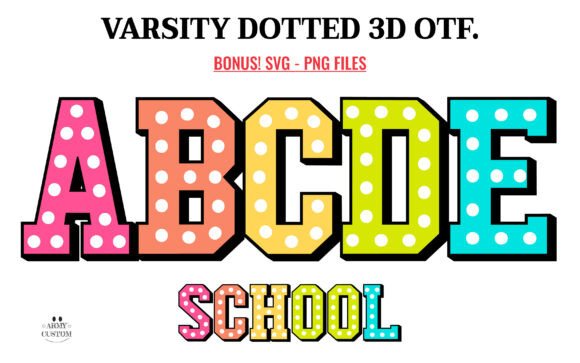
The most frequent mistake designers make with Colorful Varsity Dotted 3D involves compatibility. This font family is unique because it offers two distinct versions: a standard black version and a premium color version. Treating them as interchangeable is a recipe for frustration, particularly if you are using cutting machines.
The black version is optimized for versatility. It is fully compatible with Cricut Design Space and other popular cutting machines. If your primary goal is to create vinyl decals, iron-on transfers, or paper crafts, this is the file you need. Conversely, the color version is designed for digital precision and high-resolution printing. It works seamlessly with advanced design programs like Adobe Photoshop, Illustrator, Silhouette Studio, and Inkscape. However, the OTF or TTF files of the color version are not compatible with Cricut machines.
Ignoring this distinction can lead to wasted materials and time. Imagine preparing a batch of custom t-shirts for a local sports team, only to find that the colorful, dotted details fail to render correctly on your cutter. To avoid this, always check your workflow before purchasing or downloading. If you are a beginner using a basic cutting machine, stick to the black version and apply color through layered vinyl or fabric choices. If you are a professional designer working in digital spaces, leverage the color version for its rich, textured edge.
Avoiding Visual Clutter and Legibility Issues
Another common oversight is ignoring readability. The 3D dotted effect of Varsity Dotted 3D is visually striking, but it is also complex. The dots create a textured, dimensional edge that can become noisy if used incorrectly. A frequent error is using this font for long paragraphs of body text. The intricate details that make it perfect for headlines can overwhelm readers when scaled down or used in dense blocks.
For effective communication, reserve this typeface for powerful statements. Use it for titles, logos, short slogans, or emphasis words. For example, if you are designing a poster for a university fundraiser, use Varsity Dotted 3D for the event name and date, but pair it with a clean, sans-serif font for the detailed description. This contrast ensures that the collegiate spirit is highlighted without sacrificing clarity.
Additionally, consider the background. The dotted texture relies on contrast to be visible. Placing this font over a busy, patterned background can cause the dots to blend in, rendering the text illegible. Always test your design on solid or subtly gradient backgrounds to ensure the 3D effect pops. If you must use a complex background, consider adding a subtle drop shadow or outline to separate the text from the imagery.
Choosing the Right Context for Application
While this font captures the adrenaline-charged world of athletics, it is not limited to sports. Many creators mistakenly pigeonhole it into only athletic contexts. In reality, Varsity Dotted 3D is a testament to the intellectually stimulating realm of academia as well. It works beautifully for educational materials, alumni newsletters, and scholarly event branding. The key is to balance the energetic vibe with the tone of the message.
For instance, a tech startup looking to convey innovation and teamwork might use this font to suggest a dynamic, collaborative culture. A bookstore hosting a literary festival could use it to evoke a sense of classic university tradition. The mistake lies in forcing the font into contexts where its bold, assertive nature clashes with the message, such as formal legal documents or minimalist luxury branding. Always ask yourself: does the textured, dimensional edge enhance the story I am telling?
Best Practices for Implementation
To get the most out of this premium font, follow these practical steps:
- Verify Software Compatibility: Before starting your project, confirm whether your software supports the specific file type you intend to use. Refer to the Ultimate Font Guide for detailed instructions on installation and usage.
- Test Scale and Spacing: The dotted effect may require slight adjustments in kerning (letter spacing) to ensure the dots do not merge or appear disjointed. Experiment with different sizes to find the sweet spot where the texture is visible but not overwhelming.
- Layer Wisely: If using the black version with cutting machines, plan your layers carefully. The 3D effect can be simulated by layering different colored vinyls, but this requires precise alignment. Take your time during the weeding and application process.
- Maintain Brand Consistency: If you are using this font for a brand, ensure it aligns with your overall visual identity. The vibrant nature of the font should complement, not clash with, your existing color palette and design elements.
By approaching Colorful Varsity Dotted 3D with a clear understanding of its technical requirements and aesthetic strengths, you can create designs that are both visually attractive and functionally sound. Whether you are crafting a simple gift or launching a major marketing campaign, this font offers a unique way to convey energy and tradition. Remember, the goal is to let the typography enhance your message, not distract from it. With careful planning and attention to detail, you can harness the dynamic fusion of athleticism and intellect that this font represents, creating powerful statements that resonate with your audience.