Mastering the Witch Hat Laser Engrave 3D PNG Set for Professional Results
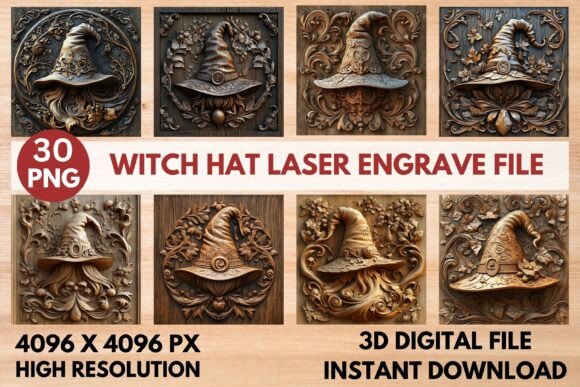
Adding a touch of mystery and magic to your artwork requires more than just a spooky theme; it demands precision, texture, and depth. The Witch Hat Laser Engrave 3D PNG Set offers a unique solution for creators looking to elevate their Halloween projects, gothic decor, and artistic engraving work. This enchanting bundle includes thirty high-resolution files that blend fantasy with intricate craftsmanship. However, simply downloading these assets is not enough to guarantee a professional outcome. Many crafters and designers overlook critical technical details when working with simulated 3D engraving files, leading to wasted materials and subpar results.
Understanding how to properly utilize this collection can save you time, money, and frustration. Whether you are a seasoned CNC operator or a hobbyist exploring digital design for the first time, recognizing common pitfalls is essential. This guide explores the nuances of using these specific assets, helping you avoid mistakes that often plague beginners and even experienced users who rush through the preparation phase.
The Misconception of "Ready-to-Cut" Files
One of the most frequent misunderstandings involves the difference between vector cut files and raster engraving images. The Witch Hat Laser Engrave 3D PNG Set provides high-resolution PNGs, specifically designed for engraving, not cutting. A common mistake is attempting to use these files directly for laser cutting without proper software interpretation. Because these are pixel-based images with realistic wood-tone textures, they do not contain the clean paths required for cutting outlines.
If you attempt to cut along the edges of these PNGs without tracing them into vectors first, your laser cutter may struggle with jagged edges or fail to recognize the boundary entirely. To avoid this, always use image tracing features in software like LightBurn or Adobe Illustrator to create a clean cut line around the hat if your project requires physical separation from the material. Keep the PNG itself strictly for the engraving pass to capture those detailed floral and ornamental carvings.
Ignoring Material Compatibility and Contrast
Another overlooked detail is the interaction between the grayscale values in the file and your chosen material. The set includes fifteen grayscale PNGs ideal for precision laser engraving. These files rely on varying shades of black and white to dictate laser power and speed, creating the illusion of depth. A significant error occurs when users apply these designs to materials that do not contrast well with burnt wood tones, such as dark walnut or already-stained plywood.
When the base material is too dark, the subtle gradients in the witch hat’s brim and decorations disappear, resulting in a muddy, indistinct image. For best results, test these designs on light-colored woods like birch, maple, or basswood. The natural light tone of these woods allows the laser’s burn marks to stand out sharply, preserving the intricate details of the wood carvings depicted in the design. If you must use darker materials, consider adjusting the brightness and contrast settings in your laser software to exaggerate the differences between the highlights and shadows.
Overlooking Resolution and Scaling Issues
While the Witch Hat Laser Engrave 3D PNG Set boasts a impressive resolution of 4096 x 4096 pixels, scaling errors remain a persistent issue. Users often resize images disproportionately within their design software, which distorts the aspect ratio of the witch hats. This distortion can make the ornate floral patterns look stretched or compressed, ruining the aesthetic balance of the piece.
Always maintain the original aspect ratio when resizing. Furthermore, do not upscale these images beyond their native resolution. Although 4096 pixels is substantial, enlarging them significantly for large-format signage will introduce pixelation. The crisp textures that make these engravings look three-dimensional will break down into visible blocks, detracting from the magical realism the design aims to achieve. If you need a larger physical size, ensure your laser’s DPI settings are adjusted appropriately to compensate, or keep the physical dimensions within the range where the pixel density remains high.
Confusing Coloring Pages with Engraving Maps
The bundle includes two distinct types of files: fifteen coloring PNGs and fifteen grayscale engraving maps. A frequent error is using the coloring pages for laser engraving. The coloring versions are designed with realistic wood-tone visuals intended for digital use or print-and-color activities. They lack the precise tonal gradations necessary for a laser to interpret depth correctly.
Using a coloring page for engraving often results in a flat, overly dark burn because the software interprets the rich colors as areas requiring maximum power. Always select the dedicated grayscale PNGs for your laser projects. These files have been optimized to translate lightness into low power and darkness into high power, ensuring the floral ornaments and hat textures appear raised and detailed rather than scorched and uniform.
Neglecting Pre-Project Testing
Even with perfect files, skipping the test run is a costly mistake. Laser engines vary widely in power, lens quality, and bed stability. What works perfectly on one machine may burn too deeply or too lightly on another. Before committing to your final piece of expensive hardwood or specialty acrylic, perform a power and speed test using a small section of the witch hat design.
Focus on the most detailed areas, such as the intricate floral carvings on the brim. If these details merge into a single black blob, your power is too high or your speed is too low. If the details are faint and lack definition, increase the power or slow down the speed. This simple step ensures that the final product captures the charm and mystery intended by the design.
Maximizing Creative Applications
Beyond standard wall decor, these designs offer versatility that many users fail to exploit. Consider applying these engravings to wooden jewelry boxes, coaster sets, or even layered shadow boxes for added dimension. The no-transparent-background specification means these files are robust for various digital compositing tasks as well. You can overlay them onto different textured backgrounds in graphic design software to create mockups for client presentations before ever touching a laser cutter.
By paying attention to these technical details—material choice, file type selection, scaling integrity, and machine calibration—you transform a simple download into a professional-grade creation. The Witch Hat Laser Engrave 3D PNG Set is a powerful tool, but its effectiveness depends entirely on the user’s understanding of how digital assets translate to physical media. Take the time to prepare correctly, and your projects will reflect the high-quality craftsmanship embedded in every pixel.