Carrot Laser Engrave File: Premium 3D Design
Laser engraving has evolved from a niche industrial process into a vibrant creative outlet for makers, small business owners, and hobbyists. At the heart of every successful project is the quality of the source file. A Carrot Laser Engrave File represents more than just a digital image; it is a precision-engineered asset designed to translate seamlessly from screen to material. Whether you are working with wood, acrylic, leather, or coated metals, the difference between a muddy, unclear engraving and a crisp, professional finish often lies in the resolution and formatting of your design file.
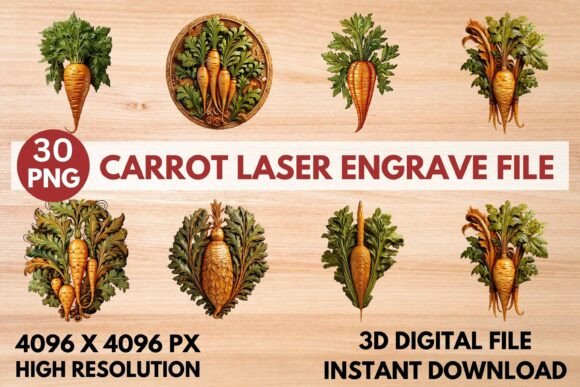
This specific design package offers a high-quality 3D laser engraving PNG that is ready to print. It is crafted specifically for users who demand clarity and depth in their projects. By utilizing a grayscale format, the file allows laser software to interpret varying shades of gray as different power levels, creating a three-dimensional effect on flat surfaces. This technique adds texture and visual interest that simple line art cannot achieve.
Why File Quality Matters in Laser Engraving
For those new to laser cutting and engraving, it can be tempting to use any image found online. However, standard JPEGs or low-resolution images often result in pixelated edges and inconsistent burning. The Carrot Laser Engrave File addresses these common pitfalls by providing ultra-high resolution assets. Each file in the package is delivered at 4096 x 4096 pixels, ensuring that even when scaled up for larger home decor items or packaging, the details remain sharp.
The inclusion of both coloring and grayscale PNG files provides flexibility. Grayscale files are essential for photorealistic or shaded engravings, where the laser modulates its power based on the darkness of the pixel. Darker areas receive more power, burning deeper or darker, while lighter areas receive less. This dynamic range is what creates the "3D" illusion on materials like wood or slate.
Tailored Benefits for Different Creators
Different users approach laser engraving with unique goals. Understanding how this file type serves various needs can help you determine if it fits your current workflow.
For Beginners and Hobbyists
If you are just starting out, the learning curve of laser software can be steep. One of the primary advantages of using a pre-optimized file like the Carrot design is ease of use. You do not need to spend hours adjusting contrast, removing backgrounds, or vectorizing images. The file comes with a transparent background, meaning it drops directly into your workspace without extra editing. For a hobbyist looking to create personalized gifts or stationery, this saves time and reduces frustration, allowing you to focus on mastering your machine’s speed and power settings rather than graphic design.
For Small Business Owners and Entrepreneurs
Consistency and professionalism are critical for commercial success. When selling custom home decor, tableware, or printed clothing, the perceived value of the product is tied to its finish. A blurry or poorly defined engraving can deter customers. This premium PNG design ensures that every item you produce looks polished and high-end. Furthermore, because the files are non-editable but resizable, you can maintain brand consistency across different product sizes without worrying about distorting the original artwork. The ability to produce reliable, eye-catching results quickly translates to better customer satisfaction and repeat business.
For Educators and Makerspaces
In educational settings, reliability is key. Instructors need files that work predictably across different machines and student skill levels. The Carrot Laser Engrave File is compatible with popular software such as LightBurn, xTool Creative Space, and Glowforge apps. This broad compatibility means students can learn the principles of grayscale engraving without technical hiccups caused by file format issues. It serves as an excellent teaching tool for demonstrating how power modulation affects material removal and shading.
Technical Specifications and Compatibility
Understanding the technical details ensures you get the best results from your equipment. The package includes a ZIP file containing 15 coloring PNG files and 15 grayscale PNG files, all at 4096 x 4096 pixels. This dual offering allows you to experiment with both full-color printing (if your machine supports it) and traditional monochrome engraving.
The files are optimized for a wide range of laser machines, including:
- Glowforge: Known for its user-friendly interface, Glowforge users will appreciate the plug-and-play nature of these high-res PNGs.
- LightBurn Users: Those using diode lasers like Sculpfun or CO2 machines with LightBurn software can easily import these files and adjust dithering settings for optimal shading.
- xTool and Other Diode Lasers: The high contrast and resolution work well with the focused beams of modern diode lasers.
It is important to note that these are raster images, not vector files. While they can be resized, they should not be converted to vectors if you wish to retain the grayscale shading effects. Always ensure your specific machine supports PNG imports and grayscale processing before purchasing.
Practical Application and Settings
To achieve the best results, proper machine calibration is essential. While every material behaves differently, the recommended settings for Glowforge users provide a solid starting point. A speed of 1000 with power set to 90 and grayscale vary power enabled typically yields strong results. Setting the quality to max and lines per inch to 270 ensures fine detail retention. If the engraving appears too light, increasing the LPI or adding a second pass can deepen the contrast.
For other machines, start with test cuts on scrap material. Adjust the power and speed to find the sweet spot where the darkest parts of the carrot design are deeply engraved without charring the lighter areas. The transparent background ensures that only the design itself is engraved, leaving the surrounding material clean and untouched.
Expanding Your Creative Horizons
The versatility of this design extends beyond simple wood plaques. Consider using it on:
- Textiles: Engrave on denim or canvas bags for a unique, worn-in look.
- Packaging: Add a premium touch to cardboard boxes for product shipping.
- Stationery: Create intricate designs on paper products or leather journals.
- Home Decor: Use on slate coasters, wooden signs, or acrylic ornaments.
By integrating high-quality assets like the Carrot Laser Engrave File into your library, you elevate the potential of your laser machine. It bridges the gap between amateur experimentation and professional production, offering a reliable foundation for creativity. Whether you are crafting a single gift or producing a batch of products for sale, the clarity and depth provided by this design ensure your work stands out.
Ultimately, the right file saves time, reduces waste, and enhances the final product. For creators who value precision and aesthetic appeal, investing in professionally crafted engraving files is a strategic move that pays dividends in quality and efficiency.