Integrating the Palm Tree Laser Engrave File into Your Creative Workflow
In the rapidly evolving landscape of digital fabrication, the difference between a hobbyist project and a professional product often lies in the quality of the source assets. For laser engraving enthusiasts and small business owners, sourcing high-resolution, machine-ready designs is a critical step in the production pipeline. The Palm Tree Laser Engrave File represents more than just a decorative image; it is a specialized asset designed to streamline the transition from concept to physical object. By utilizing a premium 3D-style grayscale design, creators can bypass the time-consuming process of manual image preparation and focus on execution, material selection, and finishing.
This article explores how to effectively integrate this specific digital asset into your workflow, ensuring compatibility with popular machines like Glowforge, xTool, and Lightburn, while maximizing the aesthetic potential of your final products.
Understanding Grayscale Assets in Laser Engraving
Before diving into implementation, it is essential to understand why a grayscale PNG is preferred over standard vector formats for certain applications. Unlike SVG files, which define paths for cutting or simple line engraving, grayscale images utilize varying shades of black and white to control laser power. In this context, black represents full power (deep engraving), while white represents no power (no engraving). The intermediate gray tones create depth, shadow, and texture, resulting in a photorealistic or 3D effect.
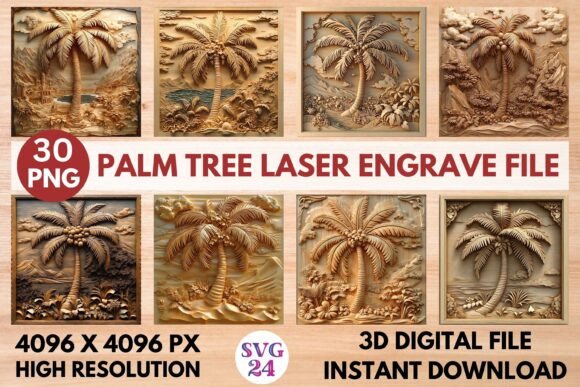
The Palm Tree Laser Engrave PNG provided in this package is optimized for this specific technique. With a resolution of 4096x4096 pixels, it offers sufficient detail for large-scale projects without pixelation. This high resolution is crucial for maintaining sharp edges on palm fronds and intricate bark textures, which can easily become muddy if the source file lacks density. By starting with a file specifically engineered for grayscale engraving, you eliminate the guesswork associated with converting standard photographs into engrave-ready formats.
Pre-Production: Compatibility and Preparation
Successful laser engraving begins long before the machine is turned on. The first phase of your workflow involves verifying that your hardware and software can interpret the file correctly. While the Palm Tree Laser Engrave File is designed for broad compatibility, understanding your specific setup ensures consistent results.
- Software Configuration: Whether you are using Lightburn, Glowforge’s web interface, or xTool Creative Space, ensure your software is set to "Image" or "Raster" mode rather than "Vector" or "Cut." Import the PNG and check that the software recognizes the grayscale values. In Lightburn, for example, you may need to adjust the "Invert" setting depending on whether your material engraves darker where the laser hits harder.
- Machine Calibration: CO2 lasers and diode lasers behave differently. Diode lasers, such as those found in Sculpfun or xTool D1 models, often require higher contrast settings to achieve deep engraving. Test the file on a scrap piece of your intended material to determine the optimal speed and power settings. The 15 included coloring variations allow you to experiment with different intensity levels without needing external editing software.
- Material Selection: This design shines on natural materials. Light-colored woods like maple, birch, and bamboo provide the best contrast for the dark engraving marks. Avoid dark woods or materials with heavy grain patterns that might compete with the detailed palm tree texture.
Execution: Optimizing the Engraving Process
Once the file is loaded and the machine is calibrated, the execution phase focuses on precision and efficiency. The transparent background of the PNG files simplifies positioning, allowing you to place the palm tree design exactly where needed on your workpiece without worrying about unwanted border artifacts.
For users managing multiple projects, organization is key. The downloaded ZIP file contains both coloring and grayscale PNGs. It is advisable to create a dedicated folder structure on your computer or cloud storage, categorizing files by theme (e.g., "Tropical," "Nature") and format. This habit reduces search time during busy production periods. When working with the Palm Tree Laser Engrave PNG, consider the orientation of the wood grain. Engraving against the grain can sometimes produce a rougher texture, while engraving with the grain yields smoother results. Rotate the digital file within your software to align the primary lines of the palm trunk with the wood grain for a cleaner finish.
Additionally, pay attention to ventilation and airflow. High-resolution, dense grayscale engravings generate significant smoke and residue. Ensure your air assist is functioning correctly to keep the lens clean and prevent scorching around the detailed areas of the palm leaves. This maintenance step is vital for preserving the clarity of the 3D effect.
Post-Production and Product Integration
The value of a digital asset extends beyond the engraving process. How you finish and present the engraved item determines its marketability and aesthetic appeal. The tropical vibe of the palm tree design lends itself to a variety of applications, from home décor to personalized gifts.
After engraving, gently clean the surface with a soft brush or compressed air to remove soot. For wood items, applying a natural oil or wax can enhance the contrast between the engraved areas and the raw wood, making the 3D details pop. If you are creating wall art, consider mounting the engraved panel on a contrasting backing board to frame the design effectively. For stationery or packaging, the subtle elegance of the palm tree can elevate brand perception, suggesting a commitment to quality and natural themes.
Entrepreneurs can leverage this asset to expand their product lines quickly. Because the file is ready to print, you can test new products with minimal upfront investment. Create a series of coasters, cutting boards, or wooden signs featuring the palm tree design. Use the different coloring PNGs to offer variations—perhaps a lighter engrave for a subtle look and a darker one for bold impact. This flexibility allows you to cater to diverse customer preferences without designing new assets from scratch.
Long-Term Workflow Efficiency
Integrating high-quality assets like the Palm Tree Laser Engrave File into your library contributes to long-term operational efficiency. By relying on pre-optimized files, you reduce the time spent on graphic design and troubleshooting image conversion issues. This allows you to allocate more resources to marketing, customer service, and scaling your business.
Furthermore, consistency is crucial for brand building. Using a standardized set of high-resolution assets ensures that every product you ship meets a certain quality threshold. Customers come to expect a specific level of detail and professionalism. When you use a reliable source for your designs, you minimize the risk of inconsistent output caused by poorly sourced or low-resolution images.
It is also worth noting that this is a digital product only. No physical items will be shipped. This instant access model supports agile workflows, allowing you to download and start producing immediately after purchase. Keep a backup of the ZIP file in multiple locations to prevent data loss, ensuring that your production pipeline remains uninterrupted.
Final Thoughts on Digital Asset Utilization
The Palm Tree Laser Engrave PNG is a tool that bridges the gap between digital design and physical craftsmanship. By understanding its technical specifications, preparing your equipment properly, and integrating it thoughtfully into your post-production processes, you can achieve professional-grade results consistently. Whether you are a hobbyist looking to enhance your home décor or a small business owner aiming to streamline your product creation, this asset offers a practical, high-quality solution. Focus on the details, respect the material, and let the design do the heavy lifting, allowing you to create serene, tropical-inspired pieces that resonate with your audience.