Witch Potion Bottle SVG File: A Guide to Flawless Halloween Laser Cutting
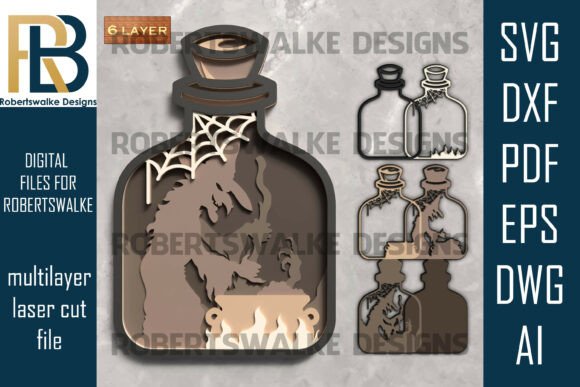
Halloween crafting often walks a fine line between charming and chaotic. When you are working with intricate designs, the difference between a professional-looking piece and a frustrating mess usually comes down to file quality and preparation. The Witch Potion Bottle SVG File by Robertswalke Designs offers a sophisticated solution for creators who want to elevate their seasonal decor. This isn’t just a simple silhouette; it is an intricate, multilayer design featuring a wicked witch stirring her cauldron inside a potion bottle, complete with spooky cobwebs and rising bubbles. However, owning the file is only half the battle. Understanding how to properly utilize this digital asset is crucial for achieving the desired 3D effect without wasting expensive materials.
Understanding the Complexity of Multilayer Designs
Many beginners make the mistake of treating all SVG files the same. They assume that downloading a file means they can immediately send it to their laser cutter or vinyl plotter and expect perfect results. This is rarely true, especially with detailed artwork like the Witch in a Potion Bottle design. This specific file is engineered for depth. It relies on layering different materials—such as wood, acrylic, or cardstock—to create a shadow box effect. If you approach this project with a single-layer mindset, you will lose the visual impact that makes the design stand out.
The inclusion of elements like the cauldron, the witch’s silhouette, and the delicate cobweb requires precise alignment. A common oversight is ignoring the tolerance settings on your machine. Laser cutters have a kerf, which is the width of material burned away during cutting. If you do not account for this in a tight-fitting multilayer assembly, your pieces may not fit together snugly, resulting in gaps that ruin the aesthetic. Before you begin, always test cut a small section of the design on scrap material to verify your machine’s precision.
Choosing the Right Material for Intricate Details
One of the most frequent errors crafters make is selecting materials that are too thick or too brittle for fine details. The Witch Potion Bottle SVG File includes tiny elements like potion bubbles and thin strands of cobweb. If you attempt to cut these from thick hardwood or low-quality acrylic, you risk breakage during weeding or assembly. For laser cutting machines like Glowforge, xTool, or CNC routers, consider using 3mm plywood or high-grade cast acrylic. These materials offer the structural integrity needed for larger pieces while still allowing for clean cuts on smaller details.
If you are using a blade-based machine like a Cricut or Silhouette, material choice is equally critical. Cardstock is a popular option, but not all cardstock is created equal. Cheap, fibrous paper can tear when you try to remove the negative space around the witch’s hat or the bottle’s neck. Opt for heavy-weight, smooth-finish cardstock that holds its shape. Additionally, ensure your blade is sharp. A dull blade will drag through the material, causing jagged edges that are impossible to hide in a layered display.
Navigating File Formats and Software Compatibility
Digital downloads often come with a variety of file formats, including SVG, DXF, PDF, EPS, DWG, and AI. A significant misunderstanding among new users is believing they need to use every format. In reality, you only need the one that is compatible with your specific software and hardware. For most hobbyists using Cricut Design Space or Silhouette Studio, the SVG format is ideal because it retains vector paths and layer information. However, if you are using industrial software for CNC routing, the DXF or DWG files might be more appropriate.
Another pitfall is failing to check the layer structure before importing the file. Some software programs automatically group elements or change colors upon import, which can confuse the cutting order. Take time to ungroup the layers in your design software. Verify that the witch, the cauldron, and the bottle are on separate layers. This step allows you to assign different cut settings or material types to each part if necessary. For instance, you might want to engrave certain details on the bottle while cutting out the witch shape entirely. Proper layer management saves time and prevents costly mistakes during the production phase.
Avoiding Assembly Nightmares
Even with perfect cuts, poor assembly can ruin your project. Many creators rush the gluing process, applying too much adhesive or misaligning the layers. With a design as detailed as this potion bottle, visibility of glue stains can detract from the magical atmosphere. Use a fine-tip applicator for wood glue or a spray adhesive for paper crafts. Apply sparingly and allow each layer to dry slightly before adding the next. This prevents shifting and ensures that the 3D effect remains crisp and defined.
Consider the lighting of your final display. This design is perfect for Halloween shadow boxes, but it needs backlighting or side lighting to truly shine. Without proper illumination, the depth created by the layers may get lost in shadow. Plan your frame depth accordingly. If you are building a shadow box, ensure there is enough space between the glass and the backboard to accommodate all the layers without compressing them. This attention to presentation transforms a simple craft into a striking piece of witchy wall art.
Maximizing Value Through Versatility
Do not limit yourself to a single application. While this file is marketed for Halloween, its utility extends further. Entrepreneurs and small business owners can use this design to create unique party favors, themed gift tags, or even educational props for storytelling sessions. The key is to adapt the scale and material to suit the end use. For example, scaling down the design and cutting it from gold foil cardstock can create elegant cupcake toppers for a sophisticated autumn gathering.
Before purchasing or downloading any digital asset, always review the license terms. Robertswalke Designs provides this file for personal and commercial use, but it is essential to confirm current terms to avoid intellectual property issues. Respect the creator’s work by not redistributing the digital file itself. Instead, sell the physical items you create using the design. This ethical approach supports the design community and ensures you have access to high-quality resources in the future.
Final Checks Before You Cut
To ensure success with your Witch Potion Bottle SVG File, follow this quick checklist. First, verify your machine’s bed size against the design dimensions. Second, inspect the vector paths for any open nodes or errors that could cause cutting interruptions. Third, select materials that balance durability with detail retention. Finally, plan your assembly strategy, including adhesive type and drying time. By addressing these practical considerations, you move beyond simple crafting into the realm of professional-grade creation. The result is a captivating piece of decor that captures the essence of Halloween mischief with precision and style.