Lighthouse 3D SVG Shadow Box Files
There is a distinct satisfaction in transforming flat materials into dimensional art. The Lighthouse 3D SVG Shadow Box Paper Files offer more than just a digital download; they provide a structured pathway to creating sophisticated home decor that commands attention. Whether you are working with a laser cutter, a CNC router, or a desktop cutting machine like Cricut or Silhouette, this design bridges the gap between technical precision and artistic expression. The result is a piece that plays with light and shadow, turning a simple wall space into a focal point of coastal tranquility.
Understanding the Multilayer Design
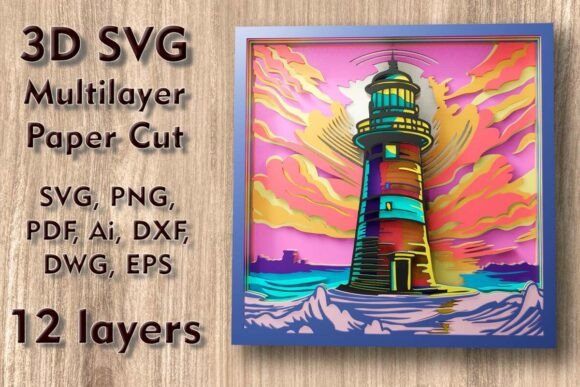
The core appeal of this project lies in its complexity managed through simplicity. The Lighthouse Mundala Svg consists of twelve separate layers. This high layer count is not arbitrary; it is engineered to create depth. When assembled, these layers produce a parallax effect that changes as the viewer moves, mimicking the way light interacts with real-world structures.
Each layer serves a specific purpose. Some define the structural outline of the lighthouse, while others add intricate details like windows, railings, and surrounding foliage. The interplay between solid cuts and negative space is what gives the final piece its "mandala" quality—a radial balance that is pleasing to the eye. For creators, understanding this hierarchy is crucial. You are not just stacking paper; you are building a scene.
Material Selection and Compatibility
One of the most versatile aspects of these Lighthouse 3D SVG Shadow Box Paper Files is their adaptability across various materials. The design is optimized for a wide range of substrates, including:
- Plywood and MDF: Ideal for laser cutters and CNC machines. Wood adds warmth and durability, making the piece suitable for long-term display.
- Cardstock and Paper: Perfect for Cricut and Silhouette users. High-quality cardstock allows for crisp edges and vibrant color layering.
- Acrylic: Offers a modern, sleek look. Translucent acrylic can be particularly effective if you plan to backlight the piece.
- Aluminum and Cardboard: Alternative options for industrial aesthetics or prototyping.
When choosing your material, consider the end goal. A paper version might be lighter and easier to hang, while a wooden version provides a substantial, heirloom-quality feel. The file formats included—SVG, DXF, DWG, EPS, AI, PNG, and PDF—ensure compatibility with almost any design software or machine interface.
Navigating Size and Scale
The base dimensions for this design are 270 x 270 mm (10.6 x 10.6 inches). This size is compact enough for shelf displays or small gallery walls but large enough to showcase the intricate details of the twelve layers. However, flexibility is key in digital crafting.
You can easily increase the size of the design to create a statement piece for a living room or entryway. Scaling up generally preserves the integrity of the cut lines, allowing for even more dramatic shadow effects. However, caution is advised when reducing the size. The design contains thin elements essential to the lighthouse’s detail. If you scale down too aggressively, these delicate bridges may become too fragile to cut or assemble, especially in wood or thick cardstock. Always test a single layer at your desired reduced scale before committing to the full project.
Creative Applications Beyond Wall Art
While shadow boxes are the primary application, the Lighthouse 3D SVG Multilayer Paper Cut Files open doors to other creative avenues. Here are several ways to adapt this design:
Illuminated Decor
Integrate LED strip lights or a small backlight panel behind the final layer. The cut-outs in the lighthouse windows and the gaps between layers will glow, creating a warm, inviting ambiance. This is particularly effective for evening displays or as a nightlight in a child’s room.
Greeting Cards and Gifts
By scaling down the design and using fewer layers, you can create intricate greeting cards. A three-to-five-layer version fits nicely inside a standard folded card, offering a surprise pop-up element that feels luxurious and personal. It makes for an exceptional gift for housewarmings, birthdays, or holidays.
Commercial Products
For small business owners and entrepreneurs, this design offers a ready-made product line. You can sell assembled shadow boxes, DIY kits with pre-cut layers, or even digital licenses for other crafters. The professional quality of the SVG files ensures that your end product looks polished and market-ready.
Technical Tips for Success
To ensure your project turns out as envisioned, follow these practical guidelines:
- Layer Organization: The ZIP folder includes layered SVG files. Keep these layers organized in your design software. Label them clearly (e.g., Layer 1 - Base, Layer 2 - Detail) to avoid confusion during assembly.
- Cut Settings: Perform test cuts on scrap material. Adjust speed and power settings based on your specific machine and material thickness. For wood, focus on clean edges to minimize sanding. For paper, ensure the blade pressure is low enough to prevent tearing but high enough to cut through completely.
- Assembly Precision: Use spacers or foam tape between layers to maintain consistent depth. This uniform spacing is critical for the shadow effect to work correctly. Start assembling from the back layer forward, checking alignment at each step.
- Color Contrast: If using paper or painted wood, consider color theory. Darker backgrounds make lighter foreground elements pop. Monochromatic schemes emphasize texture and shadow, while colorful approaches highlight the individual layers.
Why This Design Stands Out
In a market saturated with simple clipart, the Lighthouse 3D SVG Shadow Box Paper Files distinguish themselves through thoughtful engineering. The twelve-layer structure is not just about quantity; it is about quality of depth. The mandala-inspired symmetry adds a layer of visual interest that goes beyond a standard lighthouse silhouette. It invites the viewer to look closer, to trace the lines, and to appreciate the craftsmanship involved.
For educators, this project can serve as an excellent lesson in geometry, spatial reasoning, and design principles. For hobbyists, it offers a challenging yet rewarding weekend project. For professionals, it provides a reliable asset that can be customized for client needs. The versatility of the file formats means you are not locked into one workflow. Whether you prefer the vector precision of AI and EPS or the raster convenience of PNG, the tools are there to support your creative process.
Ultimately, crafting with these files is about unlocking potential. It transforms raw materials into something that evokes emotion and enhances space. By combining technical accuracy with artistic vision, you create more than just decor; you create an experience. Download the ZIP folder, select your material, and start building. The lighthouse awaits your interpretation.