3D Christmas Gnome Lantern SVG
There is a distinct magic in transforming flat sheets of material into dimensional art that captures the light and imagination. The Gnome with Lantern 3D Multilayer Cut SVG represents more than just a digital file; it is an invitation to engage in a tactile, rewarding creative process. Whether you are decorating your own home for the holidays or crafting unique items for a small business, this design offers a perfect blend of whimsical charm and technical precision. By layering materials, you create depth, shadow, and a sense of narrative that flat decals simply cannot achieve.
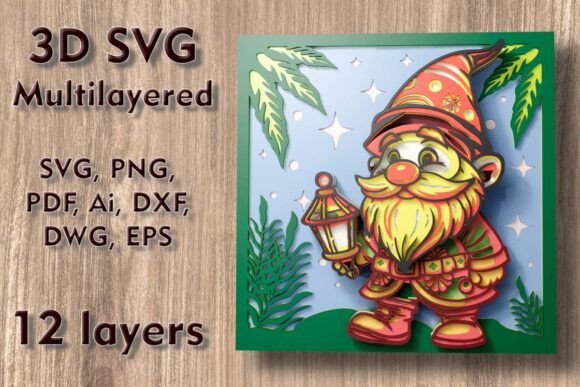
This specific design features a festive gnome holding a lantern, rendered in a style that is both modern and timeless. With a base size of 270 mm by 270 mm (approximately 10.63 inches square), it is substantial enough to serve as a focal point on a mantel, wall, or door, yet compact enough to fit within the cutting beds of most standard desktop machines. The true value lies in its versatility. While the default dimensions are optimized for balance, the vector nature of the files allows for scaling. However, crafters must exercise caution when reducing the size. The intricate details and thin connecting bridges that hold the layers together require a minimum threshold of space. Shrinking the design too aggressively can compromise structural integrity, leading to fragile pieces that break during weeding or assembly.
Understanding the Multilayer Architecture
The core appeal of this project is its construction. The design consists of nine distinct layers, though some variations or interpretations may utilize up to twelve separate elements depending on how you choose to separate colors or textures. This multilayered approach is what gives the gnome its three-dimensional presence. Each layer adds a new plane of depth, creating shadows that shift as the viewer moves around the piece. This effect is particularly striking when the lantern element is backlit or when natural light hits the angled edges of the cut material.
For those new to 3D papercraft or laser cutting, understanding the layer hierarchy is crucial. The bottom layers typically form the background and base structure, providing stability. Middle layers add definition to the gnome’s hat, beard, and body, while the top layers introduce fine details like facial features, buttons, and the intricate lattice work of the lantern. When assembling, patience is key. Using a high-quality adhesive suitable for your chosen material ensures that the layers bond securely without warping. For paper and cardstock, a fine-tip glue bottle allows for precise application, preventing visible glue spots that can detract from the final aesthetic.
Material Selection and Machine Compatibility
One of the greatest strengths of the Christmas Gnome with Lantern Mundala Svg is its adaptability across various mediums. The ZIP folder provided upon purchase includes a comprehensive suite of file formats: SVG, layered SVG, DXF, DWG, EPS, AI, PNG, and PDF. This breadth of compatibility means you are not locked into a single ecosystem. Whether you use a Cricut, Silhouette, Glowforge, or a professional CNC router, the files are ready to import.
- Plywood and Wood: Ideal for laser cutters and CNC machines. Birch plywood offers a smooth finish that takes stain or paint beautifully, while darker woods like walnut provide a rich, rustic contrast.
- Cardstock and Paper: Perfect for Cricut and Silhouette users. Heavyweight cardstock (80lb or higher) provides the rigidity needed for the layers to stand out without bending.
- Acrylic: Creates a modern, sleek look. Translucent acrylics can be used for the lantern portion to diffuse light effectively if you plan to add LED tea lights.
- MDF and Cardboard: Cost-effective options for larger projects or prototypes. MDF paints evenly, while corrugated cardboard can add an interesting textural element if the flutes are oriented correctly.
- Aluminum: For advanced users with appropriate cutting tools, thin aluminum sheets can create an industrial-chic holiday decoration.
It is important to remember that you are purchasing digital files, not a physical product. This means the responsibility for material selection and machine settings rests with you. Always perform test cuts on scrap material to dial in your power, speed, and pressure settings. This step is vital for preserving the delicate connections in the lantern and the gnome’s beard.
Creative Applications and Design Variations
While the traditional image of a Christmas gnome evokes reds, greens, and whites, this design invites experimentation. Consider using monochromatic shades of blue and silver for a "Winter Frost" theme, or earthy tones like terracotta, sage, and cream for a Scandinavian hygge aesthetic. The lantern element provides a unique opportunity for illumination. By leaving the center of the lantern open or using a translucent material, you can insert a small battery-operated LED light. This transforms the static decoration into a glowing nightlight, adding warmth to dark winter evenings.
For educators and parents, this project serves as an excellent STEM activity. Assembling the 3D structure teaches spatial reasoning, patience, and fine motor skills. Children can help color the layers before assembly if using wood or thick paper, making each gnome a personalized creation. For small business owners, these gnomes make high-margin holiday products. They can be sold as standalone wall art, incorporated into greeting cards, or used as decorative toppers for gift boxes.
Optimizing Your Workflow
To ensure consistent results, organize your digital files before you begin. The layered SVG files are particularly useful because they maintain the separation of elements, allowing you to toggle visibility and assign different cut colors easily in your design software. If you are using a laser cutter, consider the kerf—the width of the material burned away by the laser. Adjusting your design slightly to account for kerf can ensure a tighter fit between layers, resulting in a more professional finish.
When working with multiple layers, dry-fitting the pieces before applying adhesive is a best practice. This allows you to check alignment and make any necessary adjustments. Use tweezers for handling small parts, especially the intricate details of the lantern. If a piece does break, do not despair; wood glue or clear craft adhesive can often repair minor fractures invisibly if applied carefully.
The Gnome with Lantern 3D Multilayer Cut SVG is more than a seasonal decoration; it is a testament to the joy of making. It bridges the gap between digital design and physical craft, offering a satisfying project for beginners and experienced makers alike. By respecting the design’s constraints regarding size and material, and by embracing the creative possibilities of color and light, you can produce a piece of decor that brings genuine warmth and character to any space. Download the files, select your medium, and let the layering begin.